
Settings
Show Clickboxes
Show agility course obstacle clickboxes.
Show Lap count
Displays an infobox with Total Laps,
Laps until goal, and Laps per hour.
Hide Lap Count (minutes) [Configurable Box]
Configures how much time without gained XP until the lap counter is hidden.
Show Laps Until Goal
Show number of laps remaining until goal is reached.
Show Laps per Hour
Shows how many laps you can expect to complete per hour.
Overlay Color [Pick a color]
Customize the color for Agility obstacle overlays.
Highlight Marks of Grace
Enable/disable the highlighting of retrievable Marks of Grace.
Mark Highlight Color
Color of highlighted Marks of Grace.
Highlight Portals
Enable/disable the highlighting of Prifddinas portals.
Portals Highlight Color
Color of the highlighted Prifddinas portals.
Highlight Agility Shortcuts
Enable/disable the highlighting of Agility shortcuts.
Show Trap Overlay
Enable/disable the highlighting of traps on Agility courses.
Trap Overlay Color
Color of Agility trap overlay.
Agility Arena notifier
Notify on ticket location change in Agility Arena.
Agility Arena timer
Configured whether Agility Arena timer is displayed.
Highlight Stick
Highlight the retrievable stick in the Werewolf Agility Course.
Stick Highlight Color
Color of highlighted stick in the Werewolf Agility Course.

Camera
Expand Inner Zoom Limit
Allows you to zoom in closer.
Expand Outer Zoom Limit
Allows you to increase or decrease the furthest distance to which you can zoom out. (Default 0, Min -400, Max 400)
Vertical Camera
When the camera moves vertically, this option allows it to move higher than default.
Control Function
Disables zoom unless the Control key is pressed, or
allows the Control key to reset your zoom level.
Reset zoom position
The position to which zoom is reset if the
Reset zoom option of Control Function is
selected. (Default 512, Min -400, Max 1004)
Zoom Speed
The speed at which you can zoom the camera. (Default 25)
Right click moves camera
Remaps right click to middle mouse click if there are no menu options.
Ignore Examine
Ignore the Examine menu entry for right-click moving the camera.
Middle-button opens menu
Middle-mouse button always opens the menu.
Compass options
Adds Look South, East, and West to the compass' right-click menu.

Invert Yaw
Moves the camera in the opposite direction when moving horizontally.
Invert Pitch
Moves the camera in the opposite direction when moving vertically.

Settings
Draw Distance
Draw distance counted in game tiles. Max value is 90.
Note: Extended draw distance (>25) not currently available on MacOS.
Remove Color Banding
Smooths out the color banding that is present in the CPU renderer.
Anti Aliasing
Configures the anti-aliasing mode.
UI Scaling mode
Sampling function to use for the UI in stretched mode
Nearest Neighbor
Bilinear
Bicubic (Mitchell)
Bicubic (Catmull-Rom)
xBR
Fog Depth
Distance from the edge of scene at which to start drawing fog. Max value is 100.
Compute Shaders
Enables extended draw distance on supported devices.

This plugin, when enabled, allows the user to 'Alt + Left Click' on an item sold in the GE and lookup that item in the GE tab on the side.
Settings
1. Hotkey Lookup (Alt + Left click)
(Default On) If disabled, you will have to search for the item
manually in the GE tab on the right-hand side of the client, look for
the  icon.
icon.
The Ground Items plugin highlights ground items and/or displays their Grand Exchange or High Alchemy information
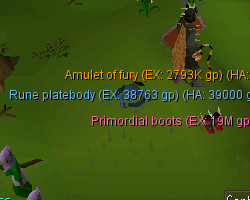
Item Lists
Highlighted Items
Configures specifically highlighted ground items.
- Format:
item,item
Hidden Items
Configures hidden ground items.
- Format:
item,item
Settings
Show Highlighted items only
Configures whether or not to draw items only on your highlighted list.
Do not hide untradeables
Configures whether or not untradeable items ignore hiding under settings.
Show Menu Item Quantities
Configures whether or not to show the item quantities in the menu.
Recolor Menu Hidden Items
Configures whether or not hidden items in right-click
menu will be recolored.
Highlight Tiles
Configures whether or not to highlight tiles containing ground items.
Notify for Highlighted drops
Configures whether or not to notify for drops on your highlighted list.
Notify >= Tier
Configures which price tiers will trigger a notification on item drop.
Price Display Mode
Configures which price types are shown alongside ground item name.
Item Highlight Mode
Configures how ground items will be highlighted.
Menu Highlight Mode
Configures what to highlight in right-click menu.
Highlight Value Calculation
Configures which coin value is used to determine highlight color.
Highlight > Value
Configures highlighted ground items over either GE or HA value.
Hide < Value
Configures hidden ground items under both GE and HA value.
Default items color
Configures the color for default, non-highlighted items
Highlighted items color
Configures the color for highlighted items.
Hidden items color
Configures the color for hidden items in right-click menu and when
holding Alt.
Low value items color
Configures the color for low value items.
Low value price
Configures the start price for low value items.
Medium value items color
Configures the color for medium value items.
Medium value price
Configures the start price for medium value items.
High value items color
Configures the color for high value items.
High value price
Configures the start price for high value items.
Insane value items color
Configures the color for insane value items.
Insane value price
Configures the start price for insane value items.
Only show loot
Only shows drops from NPCs and players.
Delay for double-tap ALT to hide
Decrease this number if you accidentally hide ground items often.
0 = Disabled.
Collapse ground item menu entries
Collapses ground item menu entries together and appends count.
Show despawn timers
Shows a green timer
 that counts down until items dropped or received as loot are visible
to other players.
that counts down until items dropped or received as loot are visible
to other players.
Shows a yellow timer
 that counts down until items dropped or received as loot despawn.
- text is from github.com/runelite